Every owned record remains visible in the master collection.
MOD4
Inventory & Sales Cockpit
The operational heart of the entire Discogs Toolkit.
MOD4 turns the enriched master collection into a working seller system. Records move from Collection to Inventory, are prepared and synchronized with Discogs, and finally move into a persistent Sold ledger. Flexible master views expose exactly the columns needed for pricing, valuation, marketplace work, reports, analytics or diagnostics.
- Promote records from Collection to sale-ready Inventory
- Prepare, validate and synchronize Discogs listings
- Move sold items into a permanent sales ledger
- Switch between Collection, Inventory and Sold workspaces
- Build flexible views from the complete master dataset
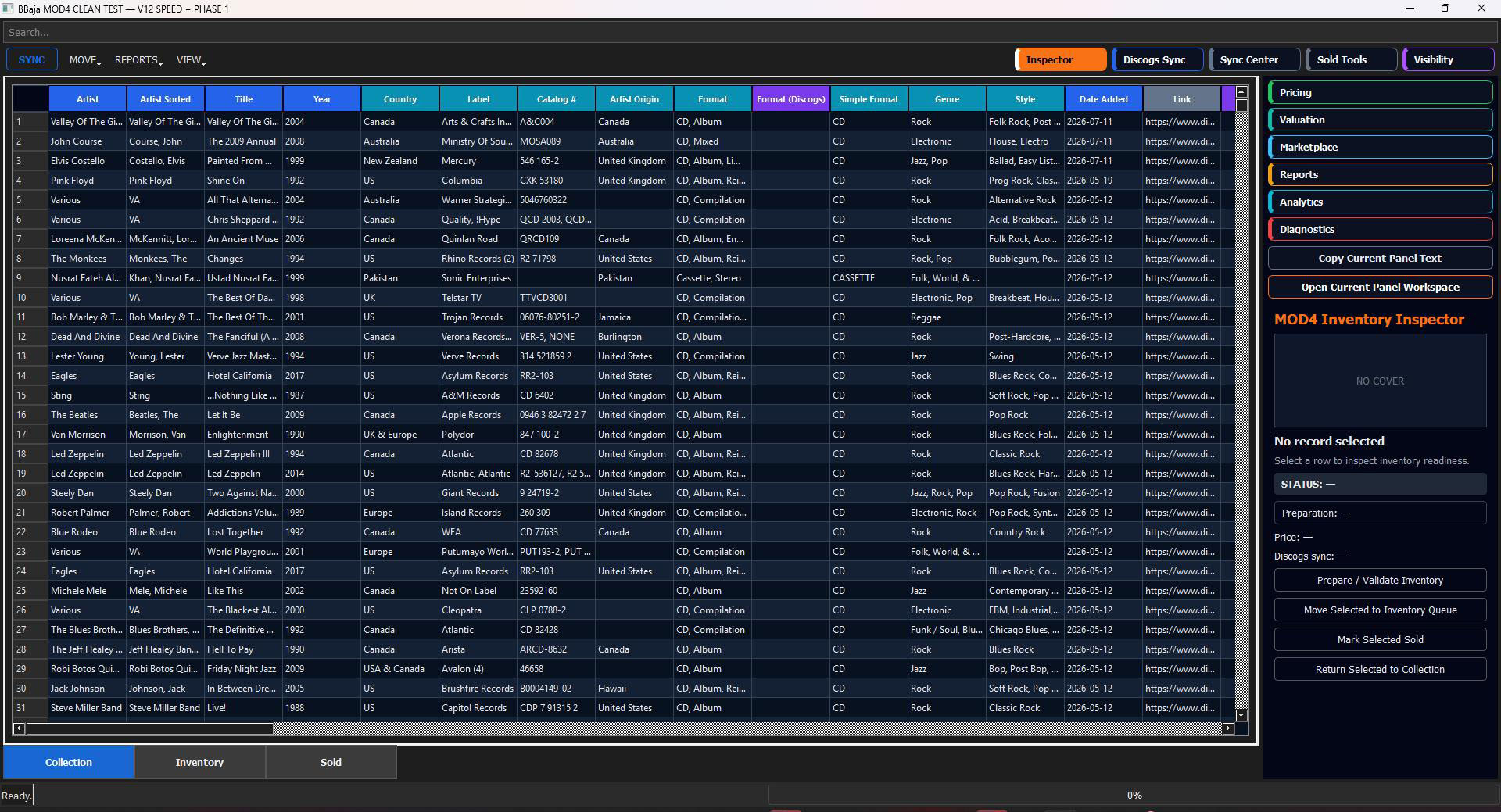
Heart of the systemOne operational cockpit connects master data, inventory, Discogs and sales history.
Collection → InventoryValidate a record, prepare it for sale and promote it into the active inventory queue.
Discogs managementAdd, update or remove listings through controlled sync tools and queue actions.
Three working statesMove naturally between Collection, Inventory and Sold without leaving the cockpit.
Live inspectorSee readiness, price, cover, preparation and sync status for the selected record.
Operational panelsPricing, valuation, marketplace, reports, analytics and diagnostics stay one click away.
One master database. Three operational states.
The collection becomes inventory. Inventory becomes sales history.
Validated, priced and prepared records become active stock.
Controlled listing actions synchronize seller inventory.
Completed sales remain permanently recorded and reportable.
Promote
Move selected records from Collection to active Inventory.
MOD4 keeps the personal collection and sale inventory inside the same master system. A record can be inspected, validated, priced and promoted without duplicate spreadsheets or manual re-entry.
COLLECTIONVALIDATEINVENTORY QUEUEREADY
Synchronize
Manage Discogs listings with a controlled action queue.
Discogs Sync and Sync Center separate preparation from execution. Add, update and delete actions can be reviewed before they are applied, while readiness and error states remain visible in the cockpit.
ADDUPDATEDELETEDRY RUNLIVE SYNC
See
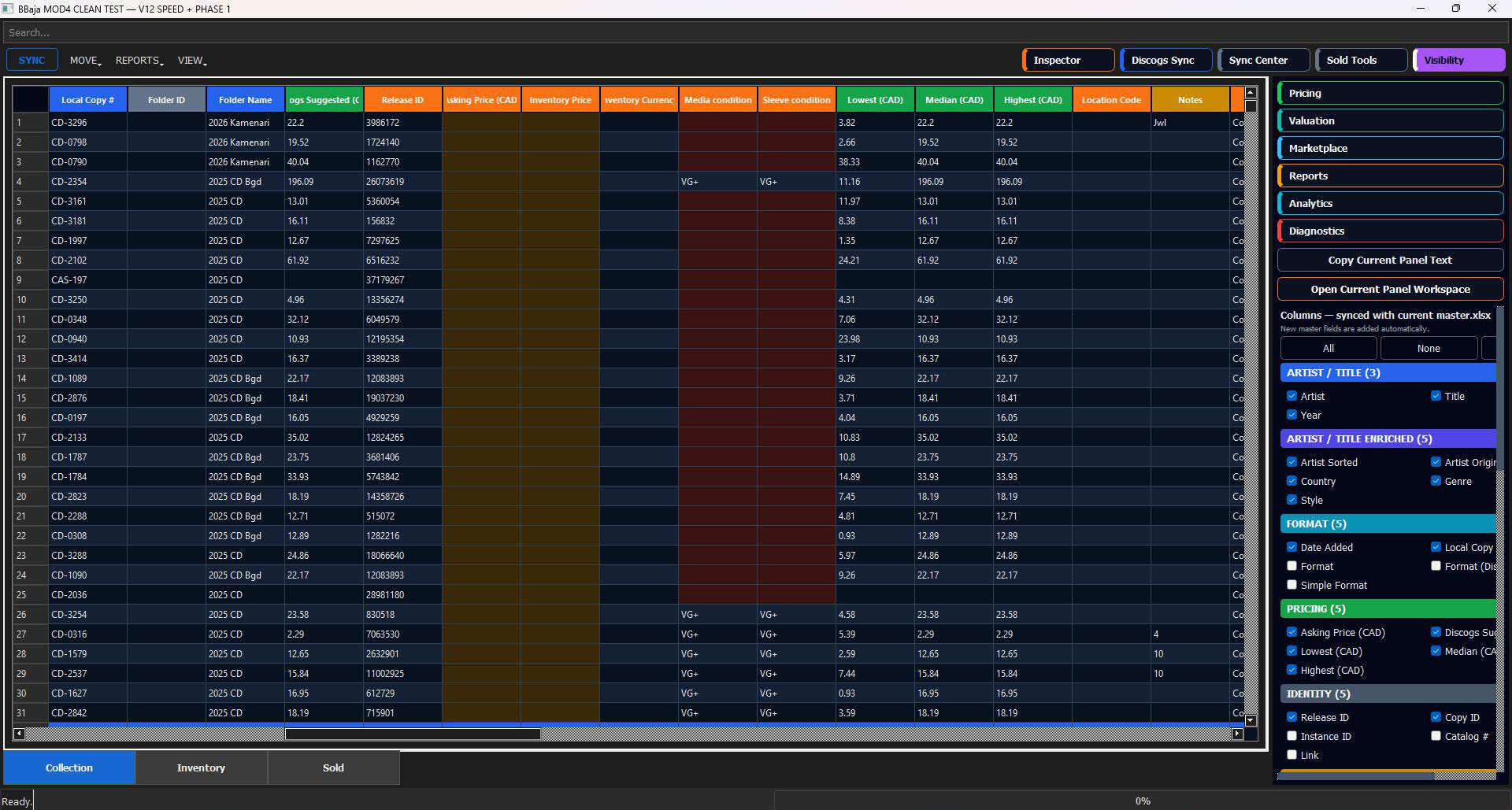
Create the exact master view needed for the task.
The Visibility workspace groups columns by artist, format, pricing, identity and operational data. Hide everything irrelevant, show only the fields needed, and reuse the same master for pricing, valuation, marketplace work or audits.
ARTISTFORMATPRICINGIDENTITYCUSTOM VIEW
Sell
Close the loop with a permanent sales ledger.
When an item sells, MOD4 moves it out of active inventory and records the transaction in the Sold workspace. Sale price, dates and item identity remain available for reports, analytics and future decisions.
MARK SOLDSALE PRICE CADSOLD DATESALES HISTORY
LOCAL COPYARTIST / TITLESALE PRICESTATUS
CD-3296Selected releaseCA$22.00SOLD
LP-0142Inventory recordCA$45.00SOLD
CAS-197Marketplace itemCA$18.00SOLD
One cockpit, many operational views
Everything required to manage and monetize the collection.
The complete MOD4 operating cycle
The heart of the Toolkit keeps every item moving.
01InspectOpen a master record and check its readiness.
→02PromoteMove sale-ready items into Inventory.
→03PriceSet pricing using Discogs references.
→04SyncPublish or update the Discogs listing.
→05SellRecord the completed transaction.
→06AnalyzeUse reports and analytics to improve decisions.
The operational centre of Discogs Toolkit
Collection, inventory, Discogs and sales — controlled from one master.
MOD4 is where enriched collection data becomes active seller inventory and measurable sales performance.